This is a machine-translated text that may contain errors!
When creating files and folders, it is wise to give them names that actually tell you
What will a good folder name mean?
Look at these folder names:
📁 things
📁 project
📁 new folder
📁 asdf
- What do the folders tell you about their contents?
Not much… you have to open them to see what’s inside - Does it work?
Yes, it works as such… But it isn’t very helpful for yourself. - Can we make it better?
Yes!
A better solution:
📁 Hero Website
📁 Interview Task
📁 Python Calculator
📁 Photoshop Poster
Here it is much easier to understand what the folders contain without having to open them first.
“This is a problem for future me” 🔮
A good name should still make sense if you open the project again in
Task 1 - Which name is best?
You have created a website about your favorite game.
Which of these folder names do you think fits best?
- 📁 website
- 📁 School assignment
- 📛 Website about Minecraft
- 📁 things
- 📁 Web Project 1
Answer:
- Which name would you choose?
- Why?
- Could any of the other names also work?
Is there always one right answer?
The most important thing is that the name is
Rename files and folders ✏️
You are guaranteed to give a file or folder a bad name at some point (or have already done so). Luckily, we can simply change the name.
It is as simple as right-clicking on the file or folder and selecting Rename.
Tip!
You can also select the file or folder and press:
- F2 if you are on Windows.
- Enter if you are on Mac.
Tip
Renaming a file or folder does not change its contents.
You are only changing what it’s called.
Task 2 - Give folders a better name
Find a folder in your Documents folder that might have a bad name and try to rename it!
Important! Two items cannot have the same name
Inside one folder, two items cannot have
So you cannot have this:
📁 Web Development
├── 📁 Hero Website
└── 📁 Hero Website ❌
If you try to create or give something a name that already exists in the same folder, your computer will therefore ask you to choose another name.
This applies to both
But what about files that appear to have the same name?
These two files actually have different names:
📄 bilde.png
📄 bilde.jpg
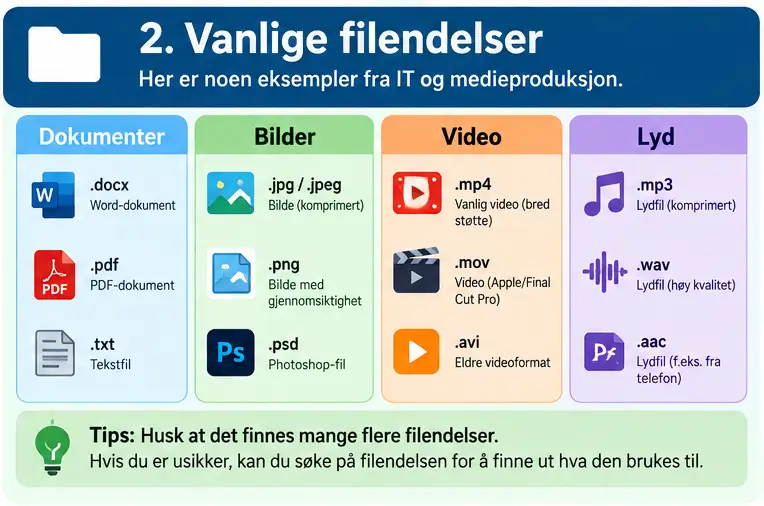
.png and .jpg are part of the filename. This is called a

Tip: Show file extensions 👀
To actually see the full filename it is advisable to enable display of
You will then for example see:
📄 image.png
📄 report.docx
📄 webpage.html
instead of just:
📄 image
📄 report
📄 website
- Open
File Explorer . - Click on View at the top.
- Select Show.
- Check File name extensions.
File extensions such as .png, .docx, and .html should now be visible.
- Open
Finder . - Press Finder → Settings at the top of the screen.
- Go to Advanced.
- Check Show all filename extensions.
Do not delete the file extension!
When file extensions are visible, they also become part of the name you see when renaming a file.
If the file is named:
bilde.png
You can freely change bilde to something else, but make sure that .png remains at the end.
The file extension tells the computer


Task 4 - Why? 🤔
Answer with your own words to the questions below:
- Why is it wise to use clear names for files and folders?
- How can a name like
projectwork fine right now but become a problem later? - How can good file and folder names make it easier to collaborate with others?
- What do you think could happen if a large project has hundreds of files with poor names?
Example solution
These are examples of answers. You don’t need to have written exactly the same thing.
1. Clear names make it easier for me to find what I’m looking for without having to open all the files and folders.
2. Right now I might know which project I mean, but later I could have many different projects and not remember which is which.
3. Others can understand what the files contain and where they should look for things without having to ask me.
4. It can be difficult to find the right file, and it’s easier to use the wrong one, lose track of things, or redo work.