This is a machine-translated text that may contain errors!
The Operating System Kernel
When you save a file, your application needs access to storage. When multiple applications are running simultaneously, they need both processor time and memory. The operating system kernel is the part of the OS that manages these resources and provides programs with controlled access to them.
You should be able to explain what work the kernel does and distinguish it from the overall operating system and the user interface.
Position in series: This is Part 3 of Operating Systems. [[Operating System Level 1 - What Is an Operating System? |Part 1]] explains the big picture; [[Operating System Level 2 – GUI & CLI |Part 2]] covers the user interfaces. Start there if those concepts are new to you. This page also serves as a foundation for virtualization and containers in Year 2 (Vg2).
The kernel is part of the operating system
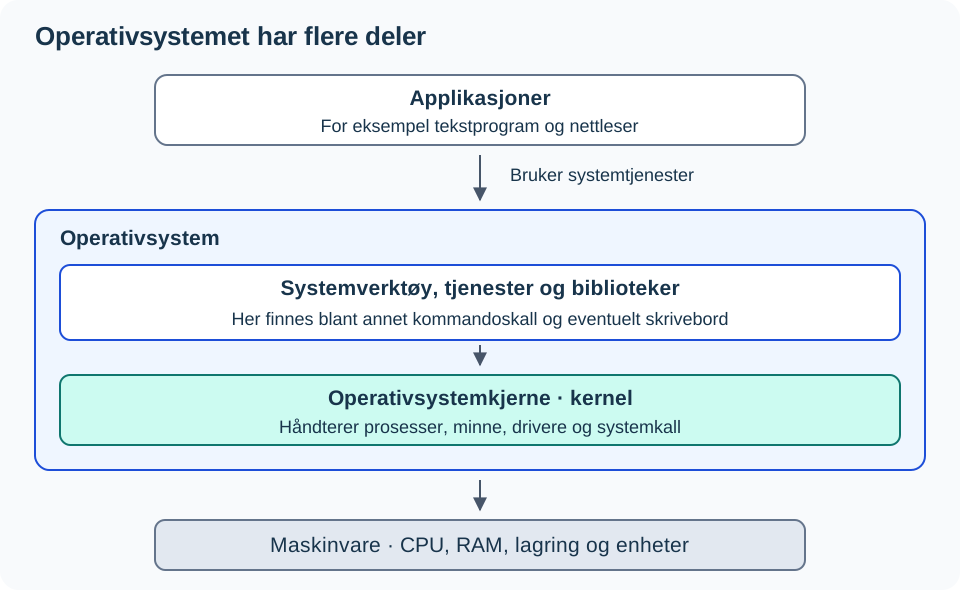
An operating system contains more than just the kernel. It also includes libraries, system services, and tools that make the system usable and manageable. A command shell or a graphical desktop provides you with an interface to the system.
Therefore, you can remove the desktop from a Linux server and still have a functioning operating system. The kernel and other essential system components remain in place.
What does the kernel do?
| Resource or task | What the kernel handles |
|---|---|
| Processor (CPU) | Distributes processor time among processes, that is, running programs. |
| Working memory (RAM) | Manages memory areas and protects them from unauthorized access by other processes. |
| Storage and devices | Provides access through file systems and drivers, among others. A driver is software that manages a specific type of device. |
| Permissions | Controls many requests from programs regarding user and process permissions. |
When a program needs a service from the kernel, it uses a system call, often via a library. The program usually runs with fewer privileges than the kernel. This is an important boundary in the system.
An example: You save a text file
- You select Save in the text editor.
- The application asks the operating system to write data to a file.
- The kernel handles the request, including permissions and access through the filesystem and drivers.
- The application receives notification of the result and can display that the save succeeded or failed.
The same type of system service is used whether the request originates from a graphical application or a command line. GUIs and CLIs are user interfaces; the kernel manages the system resources. The example is simplified: buffering and all details regarding writing to a physical disk are omitted.
Linux, Debian, and Ubuntu: What is what?
Linux is the name of an operating system kernel. In common parlance, the term is also used to refer to entire Linux-based operating systems. A Linux distribution, such as Debian or Ubuntu, combines the Linux kernel with libraries, tools, installation programs, and a package system.
| Concept | Relationship to other components |
|---|---|
| The Linux kernel | Part of a Linux-based operating system. |
| Debian and Ubuntu | Distributions built on top of the Linux kernel. They may use different kernel versions and configurations. |
| GNOME and KDE Plasma | Examples of graphical desktop environments. They can be installed or removed without changing the underlying operating system kernel. |
| Bash | A command shell that allows you to run commands. It is a program, not the kernel. |
Inspect a Linux machine, if you have one
In a Linux terminal, you can read the name and version of the running kernel:
uname -s
uname -r
The first command will display Linux. The second displays the kernel version on this specific machine; it does not need to be identical to a classmate’s. The commands change nothing and do not require sudo.
To see which Linux distribution you are using, read another piece of information:
cat /etc/os-release
Look for PRETTY_NAME, such as a name containing Debian or Ubuntu. The kernel version and distribution version are separate pieces of information. Use this section on Linux; you do not need to install Linux to perform the self-test below.
Why does the kernel appear in VMs and containers?
A VM runs a guest operating system with its own kernel. Linux containers share the kernel of the Linux system they run on. When Docker runs inside a Linux VM, the containers share the VM’s kernel.
See map of operating systems, VMs and containers for the relationships, and containerization resource for the illustrated comparison.
Check your explanation
- You are removing GNOME from a Debian server. Have you also removed the kernel? Justify your answer.
- Two programs save files simultaneously. Which part handles access to system resources?
uname -randPRETTY_NAMEshow different version numbers. Why can both be correct?
Check the answer: GNOME is the desktop environment, and removing it does not itself remove the kernel. The kernel manages the programs’ access to system resources, along with other parts of the system. uname -r displays the kernel version, while PRETTY_NAME describes the distribution.
You are ready to move on when you can explain the difference between an operating system, a kernel, and a user interface using an example of your own. If you mix up the components, use the diagram and follow the file writing process one more time. To investigate further, explain how two different Linux distributions can build upon the same type of kernel.
Sources: Red Hat: The Linux Kernel, Linux-based Operating Systems and uname. The illustration was drawn for this resource.