This is a machine-translated text that may contain errors!
What is Docker?
You’re set to spin up a webserver on a Linux server. One way’s to install the webserver and all its dependencies right into the server’s operating system. With Docker, you can grab a ready-made image instead and whip up a container outta it.
Here, you’ll be able to explain the difference between an image and a container and show what Docker does ‘twixt a command and a running service. You don’t need to install nothin’ yet.
Before ya start: Can y’all tell me the difference betwixt a VM and a container? If yer unsure, head over to Containere og virtuelle maskiner. Ye’ll see how Docker runs inside a Linux-VM on Proxmox there too.
Where this fits in the stack: Docker’s a tool for containerization. Operativsystemkjernen explains what containers share. Oversiktskartet shows the relationship ‘twixt OS, VM, container, and tools.
Docker is the tool that handles the containers
Docker can build and pull images, create and start containers, and manage their networking and storage. On a Linux server, Docker Engine does this work.
When you type docker run, you are using Docker’s command-line client. The client sends a request to the Docker service, dockerd, which manages the container. In the practice setup, both the client and the service run inside the Linux VM.
You can enter the command in the VM console within Proxmox or via an SSH session to the same VM. Both paths control Docker on the same VM. Docker Desktop is another product that bundles Docker tools into a desktop application; it is not required for the server setup here.
One image can be used for multiple containers
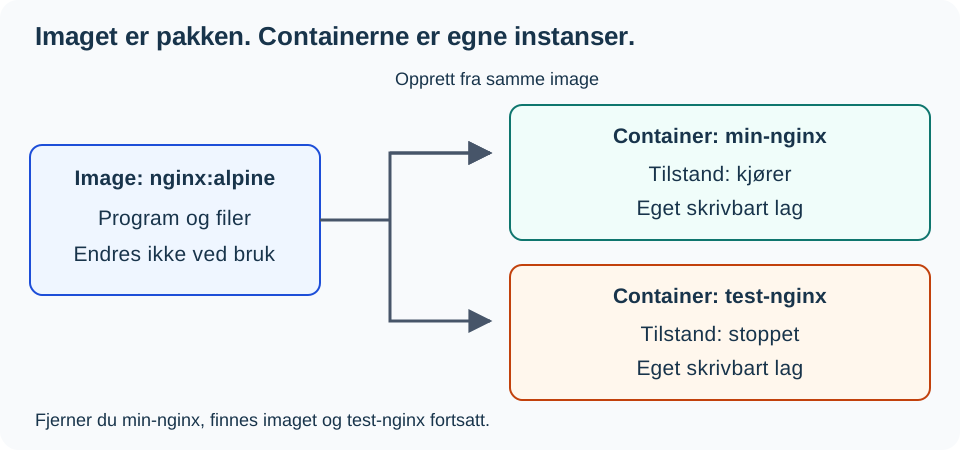
An image is a package with the files, software, and settings used to spin up a container. nginx:alpine is an example: nginx specifies the image name, and alpine is a tag, a label that points to an image variant. A tag can later point to a new version.
A container is its own instance created from the image, with its own name, state, and writable layer. The container can be created, running, or stopped. So a stopped app don’t mean the container’s been deleted.
The image don’t change when you modify a file in the container’s writable layer. If ya build another container from the same image, it gets its own writable layer.
Where does the image come from?
A container registry stores and distributes images. Docker Hub and GitHub Container Registry are two examples.
When an image exists in the registry but not on the server, you can fetch it with docker pull. You can also build your own image from source code and a Dockerfile; that’s what you’ll encounter at Level 2.
| Concept | In the web server example |
|---|---|
| Registry | Docker Hub, where the Nginx image can be fetched. |
| Image | nginx:alpine, the downloaded package. |
| Container | min-nginx, its own instance created from the package. |
| Service | The web server responding to HTTP requests while the application is running. |
What Doin’ Them First Commands Mean?
You just need to read this example right now. Installin’ an’ puttin’ it into practice comes up in Level 1.
# Pullin' up that little Alpine Nginjy image
docker pull nginx:alpine
# Spinnin' it up on port 8080 with a name fer easy findin'
docker run -d --name min-nginx -p 8080:80 nginx:alpine
# Checkin' to see if she's runnin' smooth
docker ps
The first command fetches the image. The second one spins up and kicks off that min-nginx container, hookin’ the server’s port 8080 right into the container’s port 80. The third one shows ya which containers are runnin’. Now, Nginx is the ol’ tool answerin’ to requests, while Docker takes care o’ the whole environment it runs in.
Guess what sticks around
You got one image an’ two containers from it. You halt an’ remove just min-nginx.
- Is the image still there?
- Does
test-nginxvanish too? - Can you whip up a fresh container from that image?
Check your answer: The image is still hangin’ in there, an’ test-nginx ain’t been removed. You can spin up another container from that same image. However, files that were only in the writable layer of min-nginx are gone once that container’s deleted.
You’re ready fer Level 1 when you can explain the difference in yer own words an’ point out the registry, image, container, an’ service in the example. If ya mix up images an’ containers, use the diagram an’ give it another go with different container names. Want to dig deeper? Explain why docker ps by itself don’t show if the image exists or if a stopped container is still stored away.
On to the Next Step
[[Docker Level 1 - Gettin’ Started|Install Docker Engine]]. Use the [[Containerization Level 1 - Containers an’ Virtual Machines|containerin’ resources]] fer support when ya want t’see how it stacks up aginst VMs an’ virtualizatin’.
Sources: Docker architecture, image an’ the container lifecycle. The illustration was drawn fer this resource.