This is a machine-translated text that may contain errors!
What is Docker?
You are going to set up a web server on a Linux server. One option is to install the web server and all dependencies directly in the server’s operating system. With Docker, you can instead fetch a ready-made image and create a container from it.
Here, you should be able to explain the difference between an image and a container and show what Docker does between a command and a running service. You do not need to install anything yet.
Before you begin: Can you explain the difference between a VM and a container? If you are unsure, start with Containers and virtual machines. There, you will also see how Docker can run inside a Linux-VM on Proxmox.
Place in the curriculum: Docker is a tool for containerization. The kernel explains what containers share. The overview map shows the relationship between the operating system, VM, container, and tools.
Docker is the tool that manages containers
Docker can build and pull images, create and start containers, and manage their networking and storage. On a Linux server, this work is performed by Docker Engine.
When you type docker run, you are using Docker’s command-line client. The client sends a request to the Docker service, dockerd, which handles the container. In the exercise setup, both the client and the service run inside the Linux VM.
You can enter the command in the VM console in Proxmox or in an SSH session to the same VM. Both methods control Docker on the same VM. Docker Desktop is another product that bundles Docker tools into a desktop application; it is not required for the server setup here.
One image can be used for multiple containers
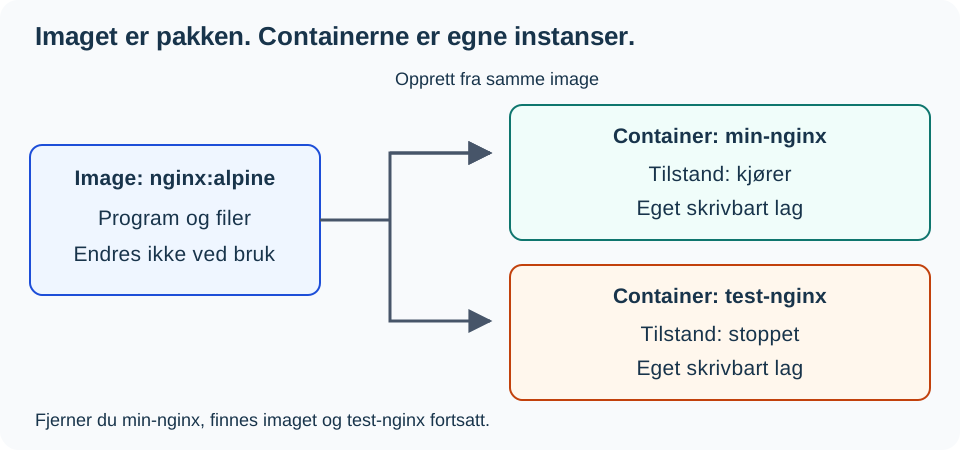
An image is a package containing the files, software, and settings used to create a container. nginx:alpine is an example: nginx specifies the image name, and alpine is a tag, a label pointing to an image variant. A tag can later point to a new version.
A container is a distinct instance created from the image, with its own name, state, and writable layer. The container can be in a created, running, or stopped state. Therefore, a stopped application does not mean that the container has been deleted.
The image is not modified when you change a file in the container’s writable layer. If you create another container from the same image, it will have its own writable layer.
Where does the image come from?
A container registry stores and distributes images. Docker Hub and GitHub Container Registry are two examples.
When an image is available in the registry but not on the server, you can retrieve it with docker pull. You can also build your own image from source code and a Dockerfile; this will be covered in Level 2.
| Concept | In the web server example |
|---|---|
| Registry | Docker Hub, where the Nginx image can be pulled. |
| Image | nginx:alpine, the downloaded package. |
| Container | my-nginx, a separate instance created from the package. |
| Service | The web server that responds to HTTP requests while running. |
What do the first commands mean?
You only need to read this example now. Installation and practical implementation will come in [[Docker Level 1 - Getting Started|Level 1]].
docker pull nginx:alpine
docker run -d --name min-nginx -p 8080:80 nginx:alpine
docker ps
The first command pulls the image. The second creates and starts the container min-nginx and maps the host’s port 8080 to the container’s port 80. The third shows running containers. Nginx is the software that responds to requests; Docker manages the environment it runs in.
Predict what remains
You have one image and two containers from it. You stop and remove only min-nginx.
- Does the image still exist?
- Is
test-nginxalso removed? - Can you create a new container from the image?
Check your answer: The image still exists, and test-nginx has not been removed. You can create a new container from the same image. However, files that were only in the writable layer of min-nginx are gone once that container is deleted.
You are ready for Level 1 when you can explain the difference in your own words and identify the registry, image, container, and service in the example. If you confuse images and containers, use the diagram and try again with different container names. To explore further, explain why docker ps alone does not show whether an image exists or if a stopped container is still stored.
Further Reading
[[Docker Level 1 - Getting started|Install Docker Engine]]. Use the [[Containerization Level 1 - Containers and Virtual Machines|containerization resource]] as a reference when you want to see the relationship with VMs and virtualization.
Sources: Docker architecture, images and the container lifecycle. The illustration is drawn for this resource.