This is a machine-translated text that may contain errors!
What is Docker?
Thou shalt set up a webserver upon a Linux-server. One path is to install the server and all dependencies directly within the operating system of that host. With Docker, thou mayst instead fetch a ready-made image and create from it an container.
Herein shallst thou be able to expound the distinction ‘twixt image and container, and shew what Docker doth betwixt a command and a running service. Thou needest not yet install any thing.
Before thou beginnest: Canst thou explain the difference between a virtual machine and a container? If thou art unsure, commence with Containere og virtuelle maskiner. There also seest thou how Docker can run within a Linux-VM on Proxmox.
Place in the subject matter: Docker is a tool for containerization. The Operating System Kernel doth explicate what containers share. The Overview Map sheweth the relation amongst operating system, virtual machine, container, and tooling.
Docker is the instrument that governs the containers
Docker may forge and retrieve images, create and commence containers, and manage their networks and storage. Upon a Linux-server, **’tis the work of Docker Engine to perform these duties.
When thou dost inscribe docker run, thou employest Docker’s command-line client. The client dispatcheth a petition unto the Docker service, dockerd, which doth tend unto the container. Within this practice setup, both the client and the service abide within the Linux-VM.
Thou mayst pen the command in the console of the VM in Proxmox or within an SSH-session unto the same VM. Both paths direct Docker in the very same VM. Docker Desktop is another artifact that gathereth Docker tools into a desktop program; it is not requisite for the server arrangement here.
One Image May Serve Many Containers
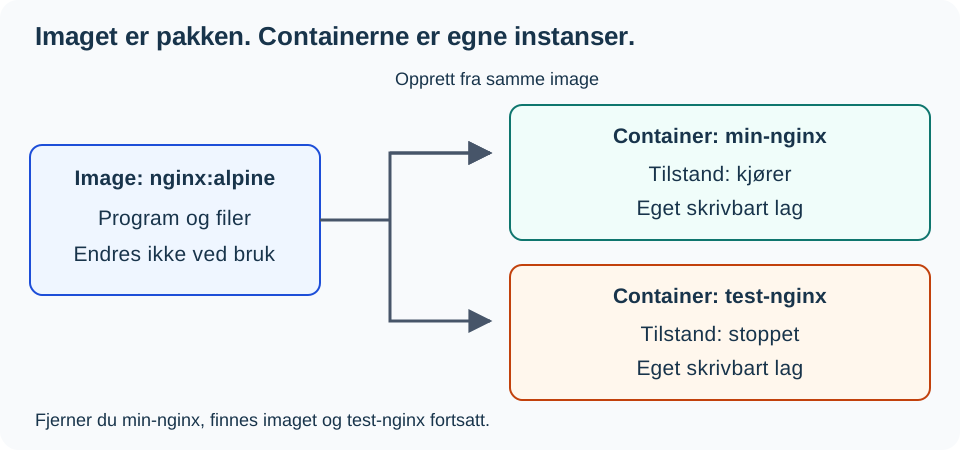
An image ‘tis a bundle containing files, programs, and settings which are used to forge a container. nginx:alpine standeth as an example: nginx declareth the name of the image, while alpine beareth a tag, a label that pointeth towards a variant of said image. A tag may later shift its gaze upon a newer version.
A container is but a separate instance born from the image, bearing its own name, state, and writable layer. Such a vessel may be created, running, or brought to rest. Thus, a halted programme signifieth not that the container hath been erased.
When thou alterest a file within the container’s writable stratum, the image suffereth no change. Shouldst thou raise another vessel from the same source, it shall possess its very own writable layer.
Whence Cometh the Image?
A container registry doth store and distribute images. Docker Hub and GitHub Container Registry are twain examples thereof.
When an image dwelleth in the registry, yet not upon the server, mayest thou fetch it via docker pull. Thou might’st likewise forge thine own image from source code and a Dockerfile; such art shall be met with thee at Level 2.
| Concept | In the web server example |
|---|---|
| Registry | Docker Hub, whence the Nginx-image may be fetched. |
| Image | nginx:alpine, the package that is downloaded. |
| Container | min-nginx, a singular instance created from the package. |
| Service | The webservice that answereth to HTTP-requests whilst the programme runneth. |
What Signify the First Commands?
‘Tis needful for thee to read but this example anon. The installation and practical execution shall come within Level 1.
The provided code block contains no comments; therefore, it remains unchanged per the strict requirement to translate only comments and preserve all other elements exactly.
docker pull nginx:alpine
docker run -d --name min-nginx -p 8080:80 nginx:alpine
docker ps
The first command fetcheth the image. The second doth create and launch the vessel min-nginx, binding the host’s gate 8080 unto the vessel’s gate 80. The third revealeth those vessels in motion. Nginx is that which answereth petitions; Docker tendeth to the realm wherein it runneth.
Foresee What Remaineth
Thou hast one image and two containers thereof. Thou haltest and removest naught but min-nginx.
- Doth the image still abide?
- Shall
test-nginxalso vanish? - Canst thou create a new container from said image?
Verify thy answer: The image doth remain, and test-nginx is not removed. Thou mayest create a fresh container from that very same image. Yet files which dwelt solely within the writable layer of min-nginx are gone when that container is destroyed.
Thou art ready for Level 1 when thou canst expound upon this distinction with thine own tongue and point out registry, image, container, and service in the example at hand. If thou dost confuse image and container, consult the diagram and try again with other names for containers. Wilt thou probe further, explain why docker ps, standing alone, showeth neither if the image existeth nor whether a halted container yet abideth stored away.
Further Onward
[[Docker Level 1 - Commence thy journey|Install the Docker Engine]]. Employ [[Containerisering Level 1 - Containers and Virtual Machines|the resource of containerisation]] as thine aid, when thou desirest to behold the kinship unto VMs and virtualization.
Sources: Docker Architecture, Image and The Life-Cycle of a Container. The illustration was drawn for this very resource.