Avast ye scallywags, this be a machine-translated missive that may contain errors!
Build a Image with Dockerfile
Here ye build an image from a Flask-app and test it with docker run. Ye are done when the app answers and ye have verified that the local .env file stays outside of the new image. The test app requires neither GitHub nor an external API.
Before ye build
Ye shall forge an image an’ prove that a vessel from said image be answerin’. Ye needs [[Docker Level 1 - Get started|Docker installed]] an’ must know how to launch an’ inspect a vessel, as shown in [[Container use Level 1 - Run and inspect a container|Run and inspect a container]]. If ye lack a Flask app, plunder the test app below. Work within yer project folder on the Linux ship, where both app.py an’ any charts or other project files lie waitin’.
If yer project rests in a code vault, [[Git in terminal Level 1 - Clone, commit and push|Git in terminal]] shows ye how to clone it onto the ship. Ye may also create the files within the ship’s text editor. Use pwd an’ ls to check that ye stand in the right hold. Do not build from an empty hold nor from the Proxmox master’s shell.
Give it a shot with a wee test ship first
If ye haven’t hoisted yer own vessel onto the VM yet, ye can drill on the Dockerfile with a meager craft. Forge a folder with mkdir min-app and cd min-app, then carve out app.py usin’ nano:
from flask import Flask
app = Flask(__name__)

@app.route("/")
def index():
    return "Greetins from the hold!"

if __name__ == "__main__":
    app.run(host="0.0.0.0", port=5000)
Then forge yerself a requirements.txt an’ a Dockerfile as shown below. Once the build holds fast, do likewise with yer own vessel.
Arr aye! Ye be craftin’ yer requirements.txt in same folder as me matey. It lists all them Python packages fer installin’ into the image. Fer that simple flask app from Chapter One, usin’ naught but Flask, here be the contents:
Flask
If ye be usin’ third-party libraries in yer scurvy app, they must be listed there with their proper package names, like so: requests. Files such as .venv shall NOT be copied fer installin’ thar packages; Docker will reinstall ‘em fresh from this list. Ye may lock down versions, say by writin’ packagename==version, once ye’ve checked which versions yer ship’s software doth require.
Do also craft a .dockerignore before the first build, me hearties. It prevents local secrets, Git history, and that pesky local Python environment from bein’ hauled into the image:
.env
.git
__pycache__/
.venv/
app-data/
Arr also put yer .env in the .gitignore if ye be usin’ Git. If them ignore files already have cargo aboard, add the missing rules instead o’ swappin’ out the whole file. Use them .gitignore secrets an’ hidden treasure to check yer tracking before ye share any code with me mateys.
Forge a vessel with a Dockerfile
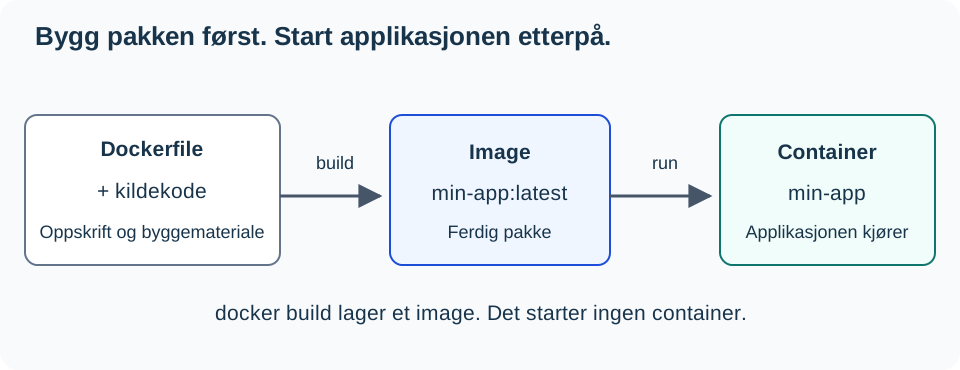
docker build crafts the package. docker run conjures and launches a ship from that package. The craftin’ alone don’t set sail on yer app. Check [[Docker Level 0 - What is Docker|Level 0]] if ye need to tell the difference ‘tween a hull an’ a fleet again.
A Dockerfile lays out the steps the sea dogs must follow to forge a vessel. Every line does one specific deed:
FROM python:3.12-slim

WORKDIR /app
COPY requirements.txt .
RUN pip install --no-cache-dir -r requirements.txt

COPY . .
EXPOSE 5000
CMD ["python", "app.py"]
Arrr! The Docker beast builds her step-by-step. COPY an’ RUN may tack on filesystem layers, while CMD, among other things, charts how the ship shall set sail. Docker can reuse prior build loot from a stash (the build cache). But when one step needs rebuildin’, all steps behind it must be run again as well.
That’s why we copy requirements.txt alone afore COPY . .: that long haul o’ installation comes before the source code, which changes oft:
flowchart TB
    L1["Base image: python:3.12-slim"] --> L2["Workin' folder: /app"]
    L2 --> L3["Copy over requirements.txt, ye scallywag"]
    L3 --> L4["Install th' packages with pip, arrr"]
    L4 --> L5["Haul aboard th' source code"]
COPY requirements.txt .
RUN pip install --no-cache-dir -r requirements.txt
COPY . .
If ye alter yer requirements.txt, then be sure to have Docker reinstall all the packages. ‘Tis desired that the new booty indeed lands in the image. If on’ly the source code shifts, be free touse Docker’s ready-made installation layer and forge onward from COPY . ..
When Docker doth publish a port, it forwards the traffic unto the program nestled within the vessel. Thus must the program listen upon the vessel’s seas, not merely at 127.0.0.1, which signifies “this very ship alone.” Should the program only hearken to 127.0.0.1, no other vessels shall reach it through the Docker gate.
Aye, here be an example o’ Flask
Ye must make Flask listen on all network interfaces (0.0.0.0) when she sails in a container. 0.0.0.0 means that Flask will take requests from all network cards within the hold. Replace yer existing startup block in app.py with this:
if __name__ == "__main__":
    app.run(host="0.0.0.0", port=5000, debug=False)
This be a practice rig fer the Flask development server. Before ye use this solution in production, ye must run it with an appropriate WSI-server; see Flask: Production Setup.
EXPOSE 5000 describes which port the ship uses; it does not publish the port on its own. That job belongs to -p 127.0.0.1:5000:5000 in the command below. Build and set sail:
The provided code block does not contain any comments to translate. Therefore, it is returned unchanged as per the requirement to preserve executable code exactly.
docker build -t min-app:latest .
docker run -d --name min-app -p 127.0.0.1:5000:5000 min-app:latest
docker logs -f min-app
Press Ctrl+C to cease viewin’ o’ th’ logs. Th’ container be keep on runnin’.
Haul test from th’ VM herself:
The current holdin’ has no comments nor words for me to translate into piratespeak, matey! The ship’s already sailin’ with just that one command. Here it be, unchanged:
curl http://127.0.0.1:5000
Ye shall receive the contents from the main route of yer application. In -p 127.0.0.1:5000:5000, the 127.0.0.1:5000 signifies port 5000 on the vessel’s deck, but only for programs aboard this very ship. The final number be the port within the hold. Should it fail to work, check docker ps, the logs, and that the port be properly published first.
With 127.0.0.1 at the helm, the port is sealed against the sea, so no other ships can reach the app whilst ye build and test. ‘Tis a safe default for an app in development. Without 127.0.0.1 (-p 5000:5000), the port listens on all network interfaces o’ the vessel. Ye need not do that until another ship or a proxy needs to reach the app, as seen in Level 3.
Checkpoint: Yer own image’s workin’ fine
Runnin’ curl http://127.0.0.1:5000 should show ye the app’s main deck page. For this here test rig, the reply be Aye from the container!. Tell me what docker build cooked up, an’ what docker run set sail with. If things go wrong, read through yer logs before ye press on.
Check dat da .env stays off th’ deck ye scurvy dog!
Ye need no proper key fer checkin’ dis here thingy. If yer ship ain’t got a .env already, forge one with PIGGY_TEST=inoffensive_test_value. Keep any existing file as is; do not overwrite yer precious values matey!
- Make sure
.envbe listed in both.dockerignorean’.gitignore. - Be usin’ Git? Run down de checks from de .gitignore drills. A ignored file must also not have been tracked aforehand arrr.
- Build de image anew an’ verify this path without printin’ out its contents, ya hear me?!
# Build da min-ship an' hail it "min-app:latest" fer us all
# Run da ship once wif no entrypoint, check if `.env` be missing frum `/app` an' shout out if she's gone!
docker build -t min-app:latest .
docker run --rm --entrypoint sh min-app:latest -c 'test ! -e /app/.env && echo ".env be not in /app, matey!"'
The expected result be that .env doth not exist in /app. Should this message fail to appear, inspect ye the ignore file ere ye share the image. This checks the filepath within the finished filesystem o’ the new image. It shall NOT refresh old images, other secret files, nor values written directly into code or the Dockerfile. Swap out a true key first if the prior one hath been shared with the crew.
If ye buildin’ or the app fails
Upon a ModuleNotFoundError, check yer requirements.txt an’ rebuild it all over again. Should there be failures in downloadin’ the base image or Python packages, test yer network with [[Feilsokingsmetode Level 1 - Systematisk feilsøking|Troubleshoot Method]]. When no HTTP reply comes to light, read docker logs min-app an’ verify the Flask address an’ port connection.
Next Steps
Show the application’s response and verify .env. Explain what the Dockerfile describes, what the build creates, and what docker run starts. Proceed to Docker - Publish Application. Should ye desire to chart startup an’ updates in a Compose file, then Run an’ Update Ye Ship with Compose be optional plunderin’.
Compose an’ updatin’ now rest on Run an’ Update Ye Ship with Compose.
Stowage be explained in Keep Loot Outside the Vessel; usin’ Compose stands at Run an’ Update Ye Ship with Compose.
The API scroll now lies upon Env Variable an’ API Key, ‘tis optional.