This is a machine-translated text which may contain errors!
To Build an Image with a Dockerfile
Herein thou shalt forge an image from a Flask-application and assay it via docker run. Thy task is complete when the application yieldeth its reply and thou hast verified that the local .env file remaineth without the newly minted image. This trial application requireth neither GitHub nor any external API.
Before Thou Dost Build
Thou shalt forge an image and demonstrate that a vessel from said image doth reply. ‘Tis needful thou hast installed Docker and canst launch and examine a vessel, as shown in Run and Examine a Vessel. If thou lackest any Flask application, employ the trial app below. Labours must be wrought within the project folder upon the Linux virtual machine, where both app.py and all manner of templates and other project files reside.
Should thy project dwell within a code repository, consult Git in the Terminal to learn how thou mayest clone it unto the virtual machine. Thou might’st also create the files within the text editor of the virtual machine. Employ pwd and ls to verify thou standest in the correct folder. Forsooth, build not from an empty directory nor from the Shell of the Proxmox host.
First assay with a small trial application
Hast thou yet not transposed thy application unto the virtual machine? Then do practice upon the Dockerfile with an abridged program. Create a folder via mkdir min-app and cd min-app, and fashion app.py with nano:
from flask import Flask
app = Flask(__name__)

@app.route("/")
def index():
    return "Hail from within the vessel!"

if __name__ == "__main__":
    app.run(host="0.0.0.0", port=5000)
Thereafter create requirements.txt and Dockerfile as depicted below. When the compilation succeeds, perform likewise for thine own creation.
Create requirements.txt within the same folder. It doth enumerate those Python packages which are to be installed in the image. For that simple application hailing from Flask 1, which maketh use naught but Flask alone, the contents shall thus read:
Flask
If thine application doth employ other libraries of third parties, they too must be inscribed therein with their rightful package names, such as requests. Files akin to .venv shall not be copied forth for the installation of packages; rather, Docker reinstalls them anew from this list alone. Versions may be bound fast, even so by means of package_name==version, when thou hast verified which versions thy application doth use.
Furthermore, create a .dockerignore ere the first build is wrought. It serves to prevent local secrets, the chronicle of Git, and the local Python environment from being transplanted into the image:
.env
.git
__pycache__/
.venv/
app-data/
Place thou also .env within .gitignore, shouldst thou employ Git. If the files of ignoring bear contents erefore, adde thou the lacking rules in lieu of replacing said files. Employ ye the .gitignore and secrets to govern thy tracking afore sharing thine code.
To Forge an Image via a Dockerfile
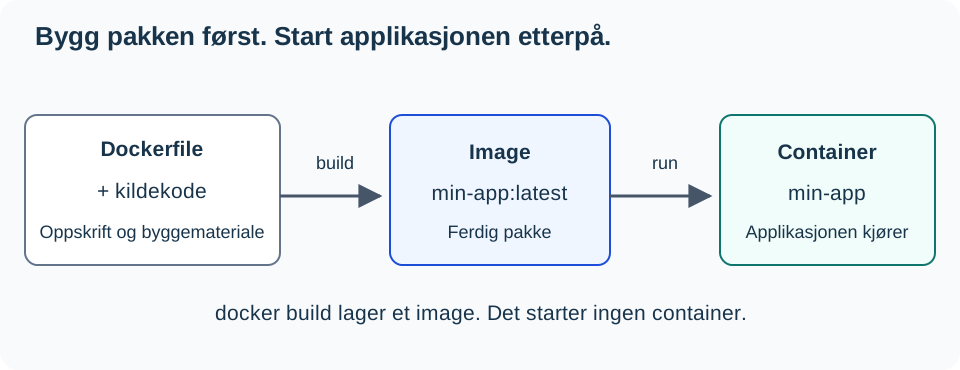
With docker build, one fashioneth the package. With docker run, one conjureth and launcheth a vessel from said package. The forging alone doth not stir the application into life. Peruse [[Docker Level 0 - What is Docker|Level 0]], shouldst thou need once more to discern ‘twixt image and vessel.
An Dockerfile describeth the steps which Docker shall employ to forge an image. Each line performeth some distinct deed:
FROM python:3.12-slim

WORKDIR /app
COPY requirements.txt .
RUN pip install --no-cache-dir -r requirements.txt

COPY . .
EXPOSE 5000
CMD ["python", "app.py"]
Docker doth execute the building in several steps. COPY and RUN may append layers unto the filesystem, whereas, among other things, CMD describeth how the vessel shall be set afloat. Docker hath power to reuse former fruits of labor from a storehouse (the build’s memory). When one step must anew be wrought, so too must all those that follow be run again.
Therefore, we copy requirements.txt alone ere we issue the command COPY . .; for this long-drawn-out installation cometh before the source code, which oft is altered:
flowchart TB
    L1["Base image: python:3.12-slim"] --> L2["Working directory: /app"]
    L2 --> L3["Copy requirements.txt"]
    L3 --> L4["Install packages with pip"]
    L4 --> L5["Copy source code"]
COPY requirements.txt .
RUN pip install --no-cache-dir -r requirements.txt
COPY . .
If requirements.txt be altered, then Docker must once again install the packages. ‘Tis as it should be: for the new package shall indeed find its place within the image. Should but the source code change alone, Docker may employ the finished layer of installation and proceed from COPY . ..
When Docker doth publish a port (https://docs.docker.com/engine/network/), it forwardeth traffic unto the programme dwelling within the container. Henceforth must that programme hearken upon the network of the container, not solely upon 127.0.0.1, which signifieth “this very container.” If the programme listeneth only to 127.0.0.1, other machines cannot reach it through the gate of the Docker port.
A Flask Example
‘Tis needful that Flask hearken unto all network interfaces (‘0.0.0.0’) whilst it runneth within a vessel. ‘0.0.0.0’ signifieth that Flask receiveth petitions upon every network card within said vessel. Supplant the extant commencement block in ‘app.py’ with this:
if __name__ == "__main__":
    app.run(host="0.0.0.0", port=5000, debug=False)
This be a practice arrangement with Flask’s development server. Ere it to be employed in production, ‘tis needful that it run upon a fitting WSGI-server; consult Flask: production setup.
EXPOSE 5000 doth declare which port the application employeth; yet alone it publisheth not said port. That task is wrought by -p 127.0.0.1:5000:5000 within the command below. Build and commence:
The provided input contains no comments (lines starting with #) within the bash code block; it consists solely of executable commands. As per the instructions (“Executable code must remain unchanged” and “Do not add… comments”), the code remains identical.
docker build -t min-app:latest .
docker run -d --name min-app -p 127.0.0.1:5000:5000 min-app:latest
docker logs -f min-app
Press Ctrl+C to cease thy viewing of the logs. The container doth still run on.
Proof thereof from within the virtual machine itself:
curl http://127.0.0.1:5000
Thou shalt have returned unto thee the content of thine application’s main route. In -p 127.0.0.1:5000:5000, doth 127.0.0.1:5000 signify port 5000 upon the server, yet solely for programs residing upon that very host. The final numeral denoteth the port within the container itself. Should it not function as intended, first consult docker ps, the logs thereof, and ensure the port is rightly published.
With 127.0.0.1 prefixed before, the port remaineth shut against the network, so no other machines may reach thy application whilst thou buildest and testest. ‘Tis a secure standard for an app in its making. Without 127.0.0.1 (-p 5000:5000), the port heareth on all network cards of the server. Such need cometh only when another machine or a proxy must gain access to the app, as seen in Level 3.
Checkpoint: Thyne owne Image Dootheth
curl http://127.0.0.1:5000 shall shew thee the app’s chief page. For this trial application, the reply is Hei fra containeren!. Declare what docker build hath wrought, and what docker run hath set afoot. In case of error, peruse thou the logs ere thou proceedest further.
Verifie thou that .env is kept without bounds
Thou need’st no true key to verify this deed. If thy project hath yet naught of a .env, create it with PIGGY_TEST=benign_testvalue. Do keep any file already present; overwrite not thine own values.
- See that
.envdoth stand in both.dockerignoreand.gitignore. - Shouldst thou use Git, run the checks within the .gitignore exercise. A file ignored must likewise be untracked from before.
- Build anew the image and check this filepath without revealing its contents:
# To forge the vessel of our app, most latest of its kind
docker build -t min-app:latest .
# And let it run, then vanish; if no .env doth exist within /app, proclaim its absence
docker run --rm --entrypoint sh min-app:latest -c 'test ! -e /app/.env && echo ".env findes ikke in /app"'
The expected outcome is that .env doth exist not within /app. Should this message fail to appear, examine the file of disregard ere thou dost share the image. This verifieth the path of files within the hallowed filesystem of thine erstwhile creation. It reneweth naught the elder images, nor other secrets concealed in parchment, neither values inscribed directly upon code or the Dockerfile. Exchange a true key forthwith if the former hath been shared with another soul.
If Building or App Fails
Upon a ModuleNotFoundError, thou shalt verify thy requirements.txt and build anew. Shouldst thou encounter mishaps in downloading base image or Python packages, then prove thy network with [[Feilsokingsmetode Level 1 - Systematisk feilsøking|Feilsøkingsmetode]]. When no HTTP reply is had, read upon docker logs min-app and examine the Flask address and port binding most diligently.
The Next Steps
Reveal the application’s response and the scrutiny of .env. Expound upon what the Dockerfile doth describe, what the building process createth, and what docker run bringeth to life. Proceed unto Docker - Publish Application. Shouldst thou desire to depict commencement and renewal within a Compose-file, then Run and Update the App with Compose is an optional deepening.
Compose and renewal now reside at Run and Update the App with Compose.
Storage is expounded in Preserve Data Outside the Container; the Compose usage standeth at Run and Update the App with Compose.
The API prescription now resteth upon Environment Variable and API Key, which is optional.