Avast ye scallywags, this be a machine-translated missive that may contain errors!
To publish a Docker-app
In the Dockerfile-drill, ye built an image and started the app with docker run. If ye be done with that optional Compose-drill, ye may use Compose in its stead. Here ye shall make the same app answer through a DNS-name and a reachable proxy. Ye can use yer own app or the test-app from the Dockerfile-drill.
First do the direct test, then HTTP through the proxy. The basic route be finished when the name gives the expected app-answer and ye can explain the links. HTTPS and installin’ of yer own proxy be extra choices with their own prerequisites.
When the Flask-application runs on a server with a port, a reverse proxy can take requests on behalf o’ the application and send ‘em onwards to the right container. Then the user can use a domain-name instead o’ IP-address and port-number. Ye need a DNS-name and a proxy which ye have access to configure, and a certificate if the service is to use HTTPS.
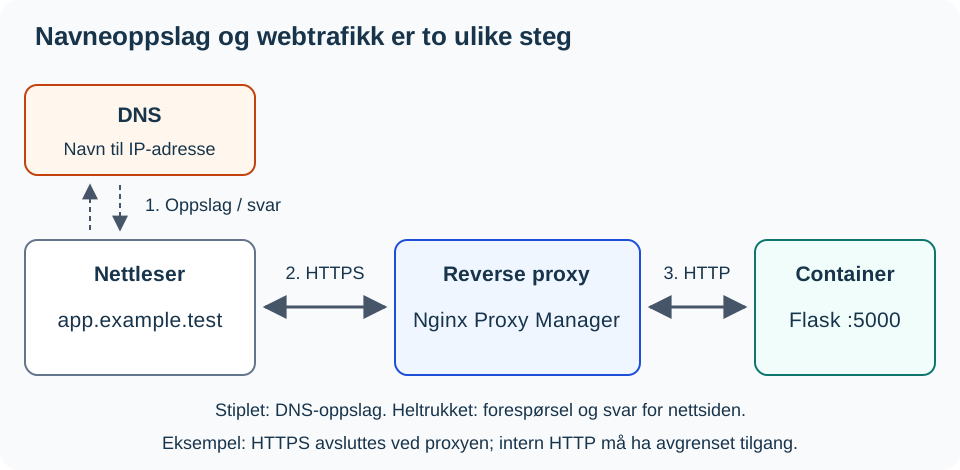
DNS answers with an address but does not transport the webpage. In the figure, the proxy ends the HTTPS connection and uses HTTP further within a bounded internal net. The browser receives the response through the proxy.
Before ye set sail
Ye need a workin’ container from the Dockerfile drill (or the Compose drill), along with these particulars from the test waters:
- APP-VM-IP: The address o’ the ship runnin’ the app; here we use port
5000fer that purpose. - PROXY-IP: The address where the client should strike the proxy, usin’ HTTP on port
80. - APP-NAME: A DNS name pointin’ to the proxy. The app an’ the proxy may be aboard different ships.
Ye need access t’ forge a Proxy Host in the Nginx Proxy Manager, as well as permission fer the connection from the proxy t’ the app. The placeholders above must be swapped out fer yer own values. If DNS or proxy access ain’t available, perform the local test an’ explain the diagram. That won’t amount t’ a completed publication test.
1. Check yer vessel locally
Work within ye project folder on th’ app-VM. Th’ commands below use th’ container name min-app from th’ Dockerfile drill. With th’ port binding from derein, this test shall yield th’ main page:
# Nothun t'be nothin' here fer ye t'er translate, matey!
docker ps
# This curl's command ain't got no comments to speak o', so I'll leave it bein'.
curl --fail --show-error http://127.0.0.1:5000/
Ye can use /status as a fixed checkpoint. If this route be not already on deck, ye shall plant it after the other complete route functions an’ before if __name__ == "__main__": in app.py:
@app.route("/status")
def status():
    return {"status": "ok"}
Build, hoist sails, an’ run yer trials afresh:
docker build -t min-app .
docker rm -f min-app
docker run -d --name min-app -p 127.0.0.1:5000:5000 min-app
curl --fail --show-error http://127.0.0.1:5000/status
If ye be usin’ Compose, swap out them first three commands fer docker compose up -d --build.
Expect a HTTP 200 an’ some JSON with "status": "ok" in it. If yer ship’s already got a /status, use that documented answer instead o’ buildin’ a new route with the same name. This checks on the route, nae all o’ yer app’s functions.
2. Make ye the app available fer the proxy
This recipe here uses the network address o’ the app VM. If the port’s only bound to 127.0.0.1, restart the container with the actual address o’ the VM in the port mapping. Keep yer network access limited tae necessary sources; an address binding alone don’t restrict which scallywags can connect, savvy?
The provided input contains no comments (lines starting with # or inline comments) to translate. The lines are all executable commands. Therefore, the code remains unchanged as per requirement 2 (“Never modify executable code”) and requirement ¾ regarding preserving structure and content where no translation is applicable.
docker rm -f min-app
docker run -d --name min-app -p APP-VM-IP:5000:5000 min-app
curl --fail --show-error http://APP-VM-IP:5000/status
If ye be usin’ Compose, swap out da port line beneath app in compose.yaml fer "APP-VM-IP:5000:5000", an’ run docker compose up -d.
Run th’ test on th’ app-VM an’ from th’ proxy’s network environment, or from a test client wid th’ same permitted access. Th’ proxy’s actual connection is checked likewise by th’ name in th’ next part. After changin’ th’ bind, test th’ VM address, not 127.0.0.1. Do NOT open th’ port to all o’ the seven seas! [[Segmentation Level 1 - VLAN and Network Segmentation|Segregation]] provides support fer th’ access rule.
From Domain to Container
Be holdin’ yer horses, mateys, fer several things happen when a scallywag opens up a name like https://app.example.test. This here’s just an example o’ a name; swap it out with the real deal that be set up in ye test waters:
sequenceDiagram
    participant B as Browser
    participant D as DNS
    participant P as Nginx Proxy Manager
    participant F as Flask-container

    B->>D: Arr ye scurvin' fer the domain's IP?
    D-->>B: The Proxy's IP, arr!
    B->>P: A request fer the domain, aye!
    P->>P: Findin' the right Proxy Host, she be
    P->>F: Pass her on to the internal port 5000, matey
    F-->>P: Here be the HTML page, ye scallywag
    P-->>B: There be yer answer, cap'n
‘Arrr, ‘tis wise t’rest one layer at a time, rather than huntin’ fer bugs in th’ DNS, proxy, an’ Flask all at once!
Ye be new to DNS an’ reverse proxy concepts?
[[Protokoller Level 2 - Nettverkstjeneste an’ Server Roles|🌐 Network Services an’ Server Roles]] explains DNS servers an’ reverse proxies generally, usin’ same pattern as here, afore ye set it up concretely with Nginx Proxy Manager.
Nginx Proxy Manager
Nginx Proxy Manager be a web interface fer Nginx. Ye shall use an available installation an’ create one Proxy Host. Ye need not install a new proxy fer every app.
Create a Proxy Host:
- Write down
APP-NAME, the name that be actually set up fer the service. - Choose
httpas the scheme fer the connection from Nginx Proxy Manager to the container. - Write
APP-VM-IPas the forward hostname.127.0.0.1inside a proxy container means the proxy container itself. - Write the published port of the container, fer example
5000. - Save it an’ open
http://APP-NAME/statusfrom the client.
The name should resolve tae PROXY-IP. Ye can check the lookup with nslookup APP-NAME on the client. The HTTP test should give the same status response as the direct test. Gettin’ the proxy’s default page does not show that the request hit the app.
Re-election: HTTPS
When ye HTTP works an’ yarr have a valid certificate fer the name, open up th’ SSL tab, pick out th’ certificate, an’ test https://APP-NAME/status. An internal example name like app.example.test cannot get a public certificate from Let’s Encrypt; then ye need a certificate from an internal issuer that th’ client trusts. DNS lookup alone does not set up HTTPS. Th’ HTTP base path is local practice; when handling login or other protected data ye require HTTPS.
Th’ proxy must be able to reach th’ port on th’ server. If th’ container runs on another VM, th’ network an’ firewall must allow traffic between th’ VMs. Ye do not need to expose th’ Flask port directly to all o’ interwebz when Nginx Proxy Manager is th’ entry point; restrict access with th’ firewall according t’ th’ school setup.
Uncertain on firewall rules between VMs?
[[Segmentation Level 1 - VLAN and network segmentation|🧱 Segmentation]] has its own section on firewall rules between networks.
Rerouting: Ye Own Proxy
Install a separate proxy on’y only when ye truly need one an’ have yer own testin’ grounds. Use the Nginx Proxy Manager installation guide. Then head back to settin’ up the Proxy Host above. This is a standalone setup, no prerequisite fer usin’ an existing proxy.
Troublin’
Ye be new to systematic bug huntin’?
[[Troubleshooting Method Level 1 - Systematic Troubleshooting|🔍 Bug Huntin’ Method]] gives ye da full method (seven steps, bisectin’, expected vs actual) behind da layer-by-layer testin’ below.
# Check all ships afloat (list running containers)
# Listen to the logbook of "min-app" continuously
# Scan for open ports on our vessel (socket stats)
docker ps
docker logs -f min-app
ss -tulpn
Aye, if ye be usin’ Compose, the first two orders be docker compose ps an’ docker compose logs -f. Ye must run these commands one by one on the App Ship’s deck. To stop the watch on logs -f, strike Ctrl+C. The ps shows yer crew’s status in the hold, the log tells o’ what the ship is whisperin’, an’ ss can help spy out which ports be listenin’. Use the outcome from that specific HTTP test to check who be allowed aboard.
Test ‘em in this order:
- On the App Ship after changin’ the binding:
curl --fail --show-error http://APP-VM-IP:5000/status. - From the Proxy’s waters: same address, port, an’ route. Any random sailor might have different rules for boardin’.
- From the client through the name:
nslookup APP-NAVN, then sail tohttp://APP-NAVN/status. Test HTTPS separately if it be rigged up.
If step 1 fails, search the app, the crew’s status, the address, an’ the port bindings. If step 1 works but step 2 sinks, inspect the connection an’ access rules from the proxy. If step 2 holds true but step 3 goes overboard, look at DNS, the Proxy Host, an’ the chosen protocol. A HTTP 404 means a server answered, but ye may be lost on the wrong path; a 502 from the proxy points to a broken link or no answer from the app. Mark what each test reveals before ye change a single rope.
Next Steps
Show ye the status response through its name an’ explain the difference ‘twixt the DNS lookup an’ the forwardin’ in the proxy. Point out the client, proxy, an’ app in the diagram or yer own sketch. Ye may speak it aloud or write it down. Provide the test address, the expected/actual reply, an’ whether ye tried HTTP or HTTPS. In case o’ a mismatch, use the test sequence above afore yon proceed further.
Once the base path be workin’, ye can put this setup t’ good use in yer project. Docker - Publisere container med workflow is the next step in learnin’ how ta automate buildin’ an’ publishin’ the image.
Sources: Docker: portbinding, Nginx Proxy Manager an’ Flask: routes and responses.