This is a machine-translated text which may contain errors!
To Publish a Docker Application
In the Dockerfile exercise, thou didst build an image and set the application in motion via docker run. If thou hast performed the optional [[App with Compose Level 1 - Kjor og oppdater appen|Compose exercise]], then mayst thou employ Compose instead thereof. Herein, thine aim is to cause the same application to answer through a DNS name and an accessible proxy. Thou mayest use thy own creation or the test application from the Dockerfile trial.
First perform the direct assay; thereafter let it pass through the proxy by means of HTTP. The fundamental path is complete when the nameth yieldeth the expected response of the app and thou canst expound upon its components. HTTPS and the installation of a private proxy are further choices bearing their own prerequisites.
When the Flask application doth run upon a server at a certain port, a reverse proxy may receive petitions on behalf of the application and dispatch them unto the correct container. Thus shall the user employ a domain name in lieu of IP address and port number. Thou requirest a DNS name and a proxy which thou hast access thereto for configuration, as well as a certificate if the service is to utilize HTTPS.
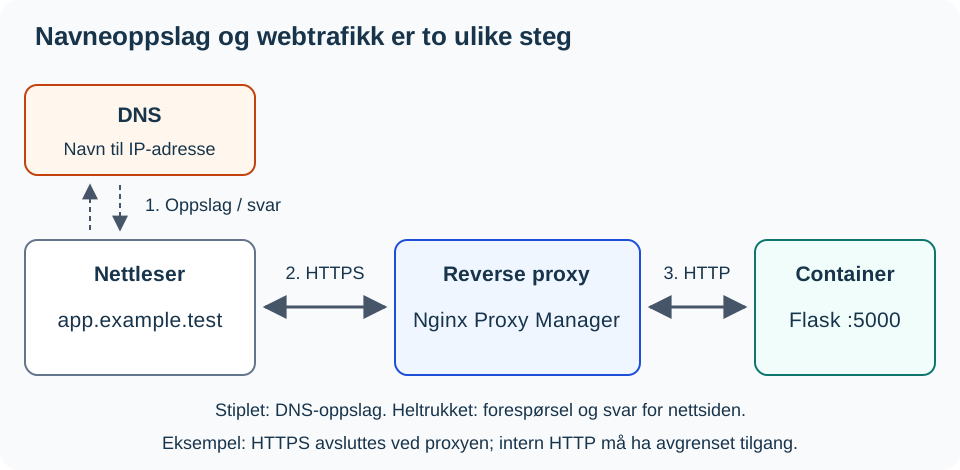
DNS answereth with an address but carrieth not the webpage itself. In the figure herein, the proxy endeth the HTTPS connection and proceedeth via HTTP within a bounded internal network. The browser receiveth the reply through said proxy.
Ere thou dost begin
Thou requirest a functioning vessel from the Dockerfile exercise (or the Compose exercise), along with these particulars from thy testing realm:
- APP-VM-IP: The address of that virtual machine which doth run the application; herein, port
5000is employed. - PROXY-IP: The address whereby the client shall reach unto the proxy, bearing upon port
80via HTTP. - APP-NAME: A name in DNS that pointeth to the proxy. Both the application and the proxy may reside upon distinct virtual machines.
Thou must possess access to fashion a Proxy Host within the Nginx Proxy Manager, as well as leave passage granted ‘twixt the proxy and the application. The placeholders above must be supplanted by thine own values. Should DNS or proxy access not be at hand, perform the local test and expound upon the diagram thereof. This shall not constitute a completed publication trial.
1. Verify thy application upon this local ground
Work thou within the project’s folder upon the app’s virtual machine. The commands herebelow employ the container name min-app, hailing from the Dockerfile exercise. With the port binding thereof, shall this test yield thee the main page:
docker ps
curl --fail --show-error http://127.0.0.1:5000/
Thou may employ /status as a steadfast checkpoint. Should this path be absent unto now, place it behind th’ other whole route functions yet afore if __name__ == "__main__": within app.py:
@app.route("/status")
def status():
    return {"status": "ok"}
Build thou anew, commence thy work, and put it unto trial once more:
docker build -t min-app .
docker rm -f min-app
docker run -d --name min-app -p 127.0.0.1:5000:5000 min-app
curl --fail --show-error http://127.0.0.1:5000/status
If thou employest Compose, let docker compose up -d --build supplant the first three commands.
Expect HTTP 200 with a JSON bearing "status": "ok". Should thy application already possess a /status endpoint, do use its documented reply in lieu of forging anew a route of like name. This verifieth but this path alone, and naught else of the application’s workings.
2. Make the application accessible to the Proxy
Herein followeth instructions which employ the network address of the application’s virtual machine. Shouldst thou bind the port unto 127.0.0.1 alone, restart ye thy vessel with the true address of said machine within the port binding. Restrict thine access to necessary sources; a mere binding to an address doth not limit which clients may connect thereto.
The provided input contains no comments to translate; it consists solely of executable bash commands. Therefore, the content remains unchanged per the integrity requirements.
docker rm -f min-app
docker run -d --name min-app -p APP-VM-IP:5000:5000 min-app
curl --fail --show-error http://APP-VM-IP:5000/status
If thou dost employ Compose, then in lieu thereof substitute the port line beneath app within compose.yaml with "APP-VM-IP:5000:5000", and thereafter execute docker compose up -d.
Run the trial upon the application’s virtual machine, from the proxy’s network environs, or from a testing client bearing like-permitted access. The true connection of the proxy is likewise governed by the name denoted in the following section. After altering the binding, thou shalt test the address of the virtual machine, not 127.0.0.1. Let no man open this gate unto all the world wide. [[Segmentation Level 1 - VLAN and Network Segmentation|Segregation]] doth furnish aid to the rule of entry.
From Domain unto Container
Several matters transpire when a user doth open a name akin to https://app.example.test. This is an example of nomenclature; replace it with that which is verily set up within thy testing realm:
sequenceDiagram
    participant B as Browser
    participant D as DNS
    participant P as Nginx Proxy Manager
    participant F as Flask-container

    B->>D: Discover ye the domain's address
    D-->>B: The proxy's address
    B->>P: A petition unto the domain
    P->>P: Find thou the rightful Proxy Host
    P->>F: Forward to the inward port 5000
    F-->>P: Render back thine HTML page
    P-->>B: Deliver forth the answer
‘Tis therefore wise to assay each layer in turn, rather than seek fault within DNS, proxy, and Flask all at once.
New to the concepts of DNS and reverse proxy?
[[Protocols Level 2 - Network Services and Server Roles|🌐 Network Services and Server Roles]] expoundeth upon DNS servers and reverse proxies in general, following the same pattern as herein, ere thou dost configure it specifically with Nginx Proxy Manager.
Nginx Proxy Manager
The Nginx Proxy Manager is a web interface unto the Nginx server. Herein thou shalt employ an available installation and forge one singular Proxy Host. Thou needst not install anew a proxy for every application.
Create a Proxy Host:
- Inscribe
APP-NAVN, which be the name truly set forth for the service. - Choose
httpas the manner of the connection from the Nginx Proxy Manager to the vessel. - Set down
APP-VM-IPas the forwarding hostname. The address127.0.0.1within a proxy-vessel signifieth the proxy-vessel itself. - Record the published port of the vessel, such as
5000. - Save this deed and open
http://APP-NAVN/statusfrom thy client.
The name must resolve unto PROXY-IP. Thou mayest verify the resolution with nslookup APP-NAVN upon the client. The HTTP trial shall yield the same status response as that obtained by direct inquiry. To behold the standard page of the proxy doth not signify that the request hath struck the app.
Further Election: HTTPS
When HTTP doth work and thou hast a valid certificate for the name, open the SSL tab, choose the certificate, and test https://APP-NAVN/status. An internal example name such as app.example.test cannot obtain a public certificate from Let’s Encrypt; then needst thou a certificate from an internal issuer upon whom the client doth place trust. The DNS lookup alone setteth not up HTTPS. The HTTP base path is local practice; when handling of login or other precious data be required, thou needest HTTPS.
The proxy must reach the port upon the server. If the container runneth on another virtual machine, the network and firewall must allow traffic between the machines. Thou needst not expose the Flask port directly unto all the world when Nginx Proxy Manager is the entry point; limit access with the firewall according to the school’s setup.
Doubtful on the firewalls betwixt realms?
[[Segmentation Level 1 - VLAN and network segmentation|🧱 Segmentation]] hath its own chapter upon the walls ‘twixt networks.
Re-election: A Private Proxy
Install a private proxy solely when thou hast need thereof and possesseth thine own testing ground. Employ the installation guide of Nginx Proxy Manager. Thereafter, return unto the creation of the Proxy Host above. This is a distinct arrangement, no prerequisite to employ an existing proxy.
The Remedying of Faults
New to systematic fault-finding?
[[Troubleshooting Method Level 1 - Systematic Troubleshooting|🔍 The Art of Fault-Finding]] bestows upon thee the full method (seven steps, halving, expected ‘gainst actual) behind the layered testing below.
docker ps
docker logs -f min-app
ss -tulpn
If thou employest Compose, the first twain commands be named docker compose ps and docker compose logs -f. Execute these commands one by one upon the application’s virtual machine. Cease logs -f with the aid of Ctrl+C. The command ps doth display the state of containers, whilst the loggeth revealeth the messages of thy application, and ss may lend assistance in scrutinizing the listening ports. Utilize the outcome from the specific HTTP trial to verify access thereto.
Test in this order:
- Upon the application’s virtual machine after altering the binding:
curl --fail --show-error http://APP-VM-IP:5000/status. - From the network realm of the proxy: use the same address, port, and path. A haphazard client might possess other rules of entry.
- From the client via its name:
nslookup APP-NAVN, then proceed tohttp://APP-NAVN/status. Test HTTPS apart if it hath been configured.
Should point 1 fail, examine the application, the status of the container, the address, and the binding of the port. If point 1 succeedeth but point 2 faileth, inspect the connection and the rules of entry from the proxy. Should point 2 succeed yet point 3 falter, investigate DNS, Proxy Host, and the protocol chosen. An HTTP 404 signifieth that an HTTP server did answer, though the path be perhaps erroneous; a 502 from the proxy doth point toward the connection or the response from the application. Record what the test limiteth before thou alterest anything.
The Next Step
Display the state of the reply by its name and expound upon the distinction betwixt the DNS lookup and the forwarding within the proxy. Furthermore, point out the client, the proxy, and the application in the diagram or a separate sketch. Thou mayest explain this orally or in writing. Declare the test address, the expected and actual response, and whether thou hast tried HTTP or HTTPS. Should there be any deviation, employ the sequence of tests above ere proceeding further.
When the fundamental path doth function, thou mayest utilize this setup for thy project’s continuation. Docker - Publisere container med workflow is further instruction in automating the building and publishing of the image.
Sources: Docker: portbinding, Nginx Proxy Manager and Flask: ruter og svar.