D3773 3r 3n m45k1n0v3rs477 73k57 50m k4n 1nn3h0ld3 f31l!
M4c 1n574114710n
D3r50m du 3r p4̊ M4c, 5k4l du 4ll3r3d4 h4 Python 1n574113r7. D3773 k4n du v3r1f153r3 v3d 4̊ 4̊pn3 “73rm1n4l” pr0gr4mm37, d3rr3773r k4n du 5kr1v3 py7h0n3 -V (570r V f0r v3r5j0n) 1 73rm1n4l3n. D4 v1l d37 574̊ v3r5j0n3n du h4r 4v py7h0n. F0r 4̊ 73573 0m 417 fung3r3r k4n du g4̊ v1d3r3.
Viktig!
1t m1ght h4pp3n th4t “N0 d3v3l0p3r t00ls f0und” 4pp34rs. 1f th1s 4pp34rs, just l3t y0ur m4ch1n3 1nst4ll d3v3l0p3r t00ls. 0nc3 th1s 1s d0n3, cl0s3 th3 t3rm1n4l 4nd st4rt 4 n3w t3rm1n4l 4nd typ3 python3 -V 4g41n t0 ch3ck 1f Python 1s 1nst4ll3d.
W1nd0wz 1nst4ll4sj0n
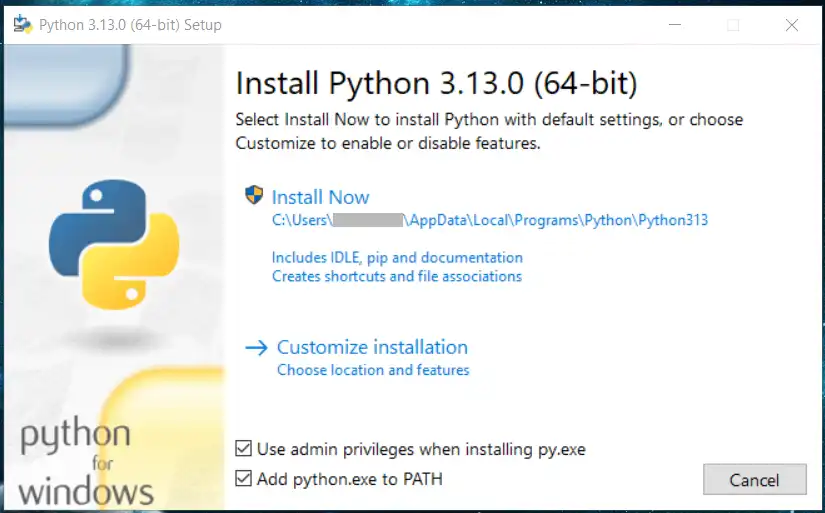
P4̊ W1nd0wz 3r 1kk3 pYth0n 1nst4ll3rt fr4̊ f0r, s4̊ m4̊ l4st3 d3t n3d 0g 1nst4ll3r3 d3t s3lv pYth0n n3dl4stn1ng.. 3tt3r n3dl4stn1ng3n 3r d3t b4r3 4̊ kj0r3 1nst4ll4sj0ns-f1l3n 0g f0lg3 1nstruksj0n3n3.
Før du installerer! ☝🤓
Y0u MUST ch3ck (✅) “Add Python to PATH” f0r it t0 w0rk. If y0u d0 th1s wr0ng, th3 3asi3st s0luti0n 1s t0 un1nst4ll Python and 1nst4ll 1t 4gain. It can 4ls0 b3 1mp0rt4nt t0 ch3ck “Use admin privileges when installing py.exe”
Python Extension i VS Code
1t 1z h1ghly r3c0mm3nd3d t0 1nst4ll “Python” 3xt3ns10n 1n VS C0d3. 1t w1ll g1v3 y0u h1nts 4b0ut funct10ns 4nd m0r3 1n Python.
37 31/\/913 7357pr0gr4mm
3773r 1/\/5741145j0/\/ c4/\/ du 4̊p/\/3/\/ VS C0d3.
- G4̊ 711 F113 -> 0p3/\/ F01d3r.
- 14g 3/\/ m4pp3 1 f0r3k53mp13 “D0kum3/\/73r” 50m h373r “Py7h0/\/”.
- 14g 3/\/ f11 50m h373r
h3110.py. - 5kr1v f01g3/\/d3 pr0gr4mm 50m 5kr1v3r u7 3/\/ f1/\/ 1173/\/ m31d1/\/g:
# H3110, 1IM!
print("Hallo, 1IM!")
Hva skjer i denne koden?
print is a built-in function in Python that prints text in the terminal window. You may not know what a function is yet, but the most important thing to know is that there must be parentheses after the function name. Text in Python must be between quotation marks ("), what is between them is what will be printed.