Avast ye, this be a machine-translated text an’ may contain errors, aye!
Mac Installin’
If ye be on a Mac, ye should already have Python installed. Ye can verify this by openin’ the “Terminal” program, then writin’ python3 -V (a capital V for version) in the terminal. That’ll tell ye the version o’ Python ye have. To test if all be workin’ proper, ye can sail onward.
Viktig!
Aye, ‘tis possible ye may see a message sayin’ “No developer tools found”. If ye do, just let yer machine install ‘em. Once that be done, close the terminal and open a fresh one, then type python3 -V again to check if Python be installed.
Windows Installation
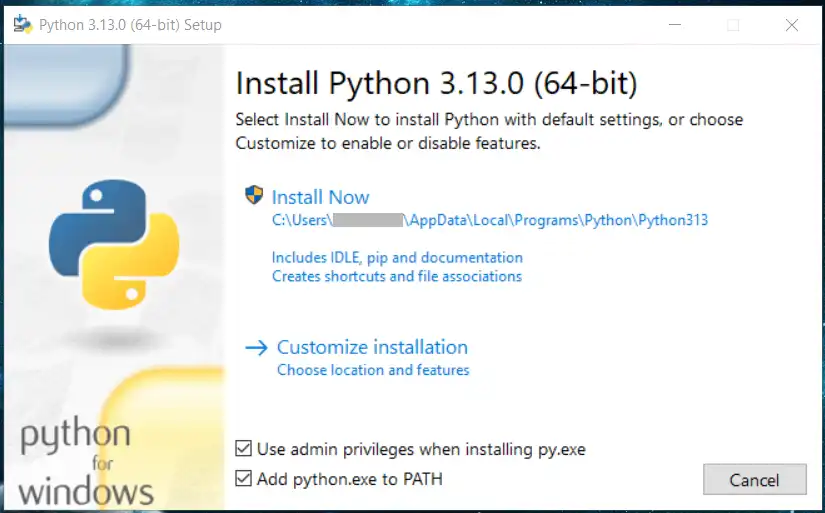
On Windows, Python be not installed by default, so we must download it and install it ourselves Python download.. After the download, ‘tis but to run the installation file and follow the instructions.
Før du installerer! ☝🤓
Ye MUST check (✅) “Add Python to PATH” for it to work, savvy? If ye blunder this, the easiest course be to uninstall Python and install it anew. It may also be important to check “Use admin privileges when installing py.exe”
Python Extension i VS Code
‘Tis heartily advised ye install the “Python” extension in VS Code, aye. ‘Twill grant ye hints o’ functions and more in Python, it will.
A Simple Test Program
After installin’, ye can open VS Code.
- Go to File -> Open Folder.
- Create a folder in, fer example, “Documents” called “Python”.
- Create a file called
hello.py. - Write the followin’ program that prints a fine little message:
# Heave ho, 1IM!
print("Hallo, 1IM!")
What be happenin’ in this here code?
print be a built-in function in Python that writes text to the terminal window. Ye may not know what a function be yet, but the most important thing to know be that there must be parentheses after the function’s name. Text in Python must be between quotation marks ("), and what be between ‘em be what will be written out.